

Emails and branding
Two Minute Billing sends your billing email for you: invoices, receipts, failed-payment notices and card-expiry reminders. This guide covers the address they come from, which ones go out, their wording, and the brand on your invoices and hosted pages.
Set up sending
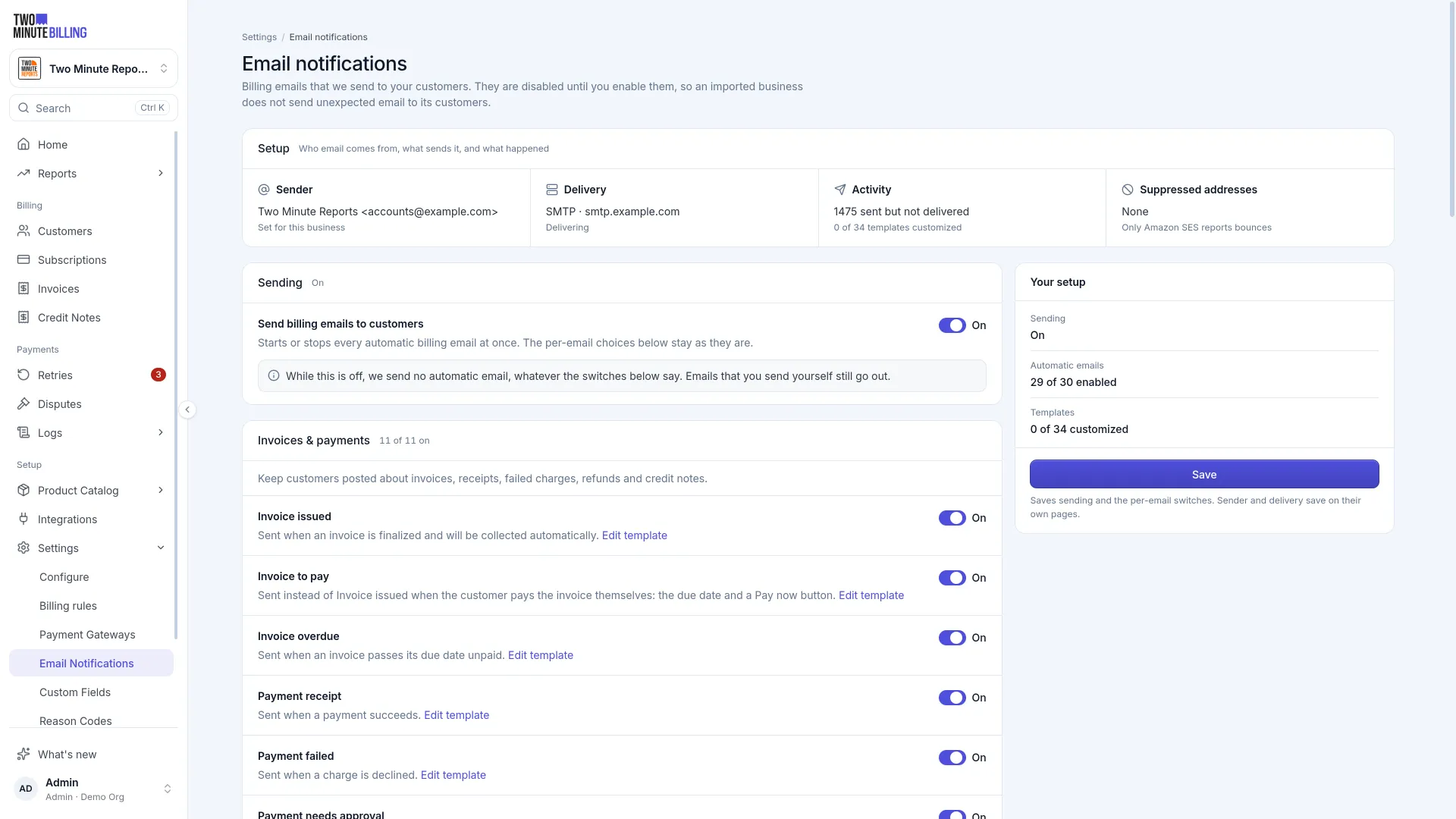
Settings → Email Notifications. Send from your own domain rather than a generic address — billing email that looks like it came from a stranger gets ignored, and ignored email becomes a failed payment.
Send yourself a test of each one before you go live.
Select what goes out
Turn individual emails on or off. The ones worth keeping on for most businesses:
| Why | |
|---|---|
| Payment failed | Your customer can fix it themselves, before anyone chases |
| Card expiring | Prevents the failure entirely — the cheapest recovery there is |
| Invoice issued | Your customer's own accounting needs it |
| Payment received | Confirms the charge they will otherwise query |
| Subscription cancelled | Confirms what they asked for, and when access ends |
Card expiry emails go only to a card that pays for a live subscription, so former customers and spare cards aren't told to update a card nothing charges. A declined signup or reactivation sends no failed-payment email: there's no invoice to pay, and nothing changed on the subscription.
Edit the wording
Each email can be customised. They go out under your name, so read them as a customer would rather than as the person who configured them.
The editor formats text the way a document does: bold, italic, links, headings and lists. Details like the customer's name or the invoice number are inserted as variables, and the preview beside the editor updates as you type, on desktop, on mobile or as plain text. Send yourself a test before you save if you want to see it in a real inbox.
Some details only exist some of the time. An invoice number is missing from a payment that was not for an invoice, for example. For those you can:
- give a fallback:
{{customerName | default: "there"}}reads "Hi there" when no name is on file - show a sentence only when the detail is set:
{{#if invoiceNumber}}for invoice {{invoiceNumber}}{{/if}}
The editor warns you when a detail could be empty and nothing handles it, and it won't save a variable that email never has.
Every email ends with a footer. Set one for your whole business under Sender (it starts as "Thanks, your business team"), and give any single email its own when it needs different words. That email's page shows which footer it's using.
You can change the button text, hide the details card, and change the order of the message, the button, the details card and the footer. Your logo and heading always come first. The button's link is always set by Two Minute Billing.
Reset to default throws away unsaved edits. On an email you've already customised, it puts back the original wording and layout after you confirm.
Who receives them
Emails go to the customer's billing email. Additional contacts on the customer get a copy too: those marked Send billing emails receive invoices, payments, dunning, refunds and payment-method emails, and those marked Send account emails receive subscription and trial updates.
Attachments
Emails about an invoice or a credit note can carry its PDF. You set this per email, on that email's page, and the change is saved straight away. Invoice emails can also skip the PDF when the invoice total is zero, and the "Invoice issued" email can skip sending altogether for a zero-value invoice, such as a free trial's first invoice.
Brand everything customers see
Under Settings, add your logo, icon and brand colour. These appear on invoices, on the hosted checkout page and in the portal.
Suppressed addresses
An address that hard-bounces or marks you as spam is suppressed, and Two Minute Billing stops emailing it. That protects your sending reputation for every other customer.
Check the suppression list when a customer says they are not getting your emails. You can lift a suppression once the underlying problem is fixed.
Related
Payment methods
What each payment method asks of your customers: cards and 3D Secure, Apple Pay and Google Pay on pay now, bank debits that stay pending, and debit mandates.
Handle disputes
See each chargeback when the customer's bank raises it, learn what happens to the invoice, and keep the evidence you need to respond to the bank in time.