

Stripe


Two Minute Billing charges cards and bank debits through your Stripe account. You keep your Stripe rates, and Stripe pays out to your bank as usual.
Before you start
- A Stripe account. Test mode works at once; live mode needs Stripe to activate your account.
- Stripe gives you two sets of keys: test and live. Connect the test keys to a test business and the live keys to a live business.
- You need permission to manage payment gateways in Two Minute Billing. The owner and admin roles have it.
Find your API keys
In Stripe, open Developers → API keys. Make sure the Test mode toggle matches the business you are connecting.
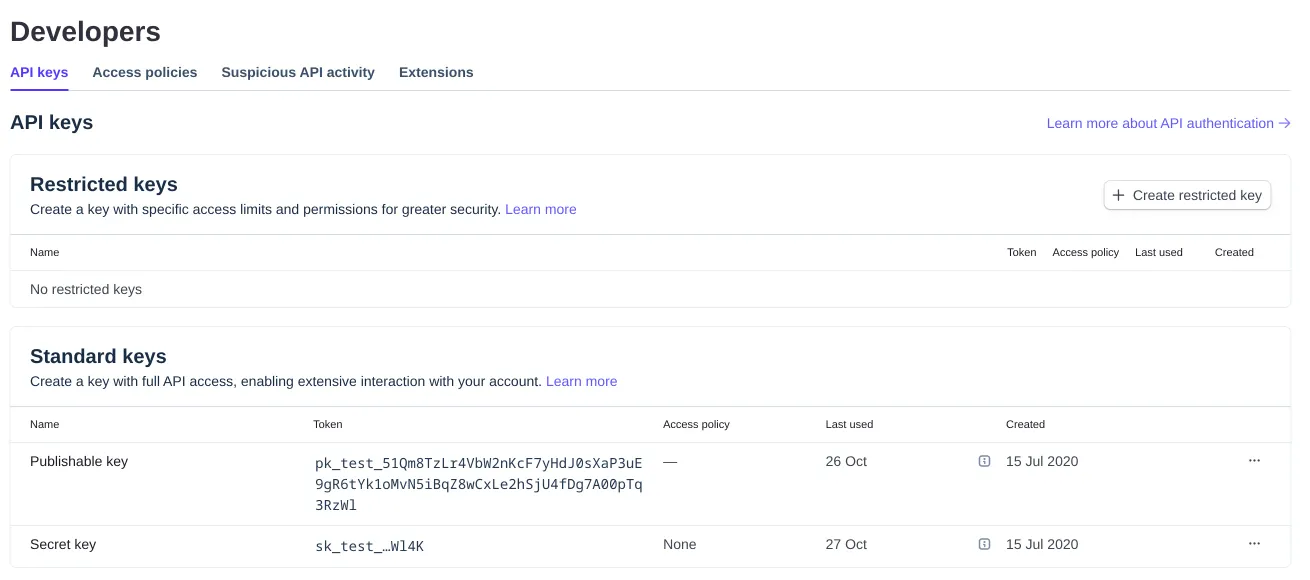
You need two values:
| Field | Where to find it | Looks like |
|---|---|---|
| Secret Key | Stripe Dashboard → Developers → API keys. | sk_live_… |
| Publishable Key | On the same page. | pk_live_… |
Permissions
| Stripe permission | Access | Two Minute Billing uses it to |
|---|---|---|
| Payment Intents | Write | Charge, capture, cancel and find payments |
| Setup Intents | Write | Save a card or a bank mandate |
| Customers | Write | Make and update the customer in Stripe |
| Payment Methods | Write | Attach and remove saved payment methods |
| Charges and Refunds | Write | Refund payments and read refunds made in Stripe |
| Payment Disputes | Read | Read a dispute when Stripe reports it |
| Mandates | Read | Read the mandate of a bank debit |
| Balance | Read | Check the credentials |
| Accounts | Read | Read your account's country when a payment method is saved |
| Payment Method Domains | Write | Register your payment domain for Apple Pay |
| Webhook Endpoints | Write | Register the webhook for you |
Connect it in Two Minute Billing
- Open Settings → Payment gateways and click Add gateway.
- Select Stripe and paste the Secret Key and the Publishable Key.
- Select the currencies and the payment methods this account handles.
- Click Create gateway account.
Then open the account and click Check credentials. Healthy means Stripe accepted the key.
The payment methods you can turn on for Stripe:
- Cards
- Direct Debit (ACH) — US only. The debit settles asynchronously.
- Direct Debit (SEPA) — EU only. The debit settles asynchronously.
Currencies
Two Minute Billing offers these 132 currencies on Stripe:
AED, AFN, ALL, AMD, AOA, ARS, AUD, AWG, AZN, BAM, BBD, BDT, BIF, BMD, BND, BOB, BRL, BSD, BWP, BYN, BZD, CAD, CDF, CHF, CLP, CNY, COP, CRC, CVE, CZK, DJF, DKK, DOP, DZD, EGP, ETB, EUR, FJD, FKP, GBP, GEL, GIP, GMD, GNF, GTQ, GYD, HKD, HNL, HTG, HUF, IDR, ILS, INR, ISK, JMD, JPY, KES, KGS, KHR, KMF, KRW, KYD, KZT, LAK, LBP, LKR, LRD, LSL, MAD, MDL, MGA, MKD, MMK, MNT, MOP, MUR, MVR, MWK, MXN, MYR, MZN, NAD, NGN, NIO, NOK, NPR, NZD, PAB, PEN, PGK, PHP, PKR, PLN, PYG, QAR, RON, RSD, RUB, RWF, SAR, SBD, SCR, SEK, SGD, SHP, SLE, SOS, SRD, SZL, THB, TJS, TOP, TRY, TTD, TWD, TZS, UAH, UGX, USD, UYU, UZS, VND, VUV, WST, XAF, XCD, XCG, XOF, XPF, YER, ZAR, ZMW
Your Stripe account's country can limit these. For example, an account in India charges cards issued in India in INR only. Stripe converts a currency that you do not settle in.
Some payment methods take one currency only:
| Payment method | Currency |
|---|---|
| Direct Debit (ACH) | USD |
| Direct Debit (SEPA) | EUR |
If you leave Currencies empty on the gateway account, the account takes each currency of your business that is on this list.
Webhooks
Stripe tells Two Minute Billing about things that happen after a charge: a bank debit that settles days later, a refund made in the Stripe dashboard, a dispute.
Two Minute Billing registers the webhook with Stripe for you when you save the account. Nothing to copy.
If the gateway account page shows the webhook as not configured:
- Click “Register with Stripe” on the gateway account page. We create the endpoint and keep the signing secret.
- Optional: confirm it appears under Developers → Webhooks in Stripe.
Test it
In your test business, create a customer and save the test card 4242 4242 4242 4242 with any
future expiry date and any CVC. Collect an invoice: it is marked paid, and Logs shows the
call to Stripe and Stripe's answer.
Go live
- In Stripe, turn Test mode off and copy the live keys (
sk_live_…,pk_live_…). - In your live business, add Stripe with those keys.
- Two Minute Billing registers a separate webhook for live mode. Check it under Developers → Webhooks in Stripe.
Troubleshoot
- Check credentials says "We could not check the credentials." with "Invalid API Key provided". The secret key is wrong or was rolled in Stripe. Copy it again from Developers → API keys and update the gateway account.
- The account page shows the webhook as not configured. Follow the steps under Webhooks.
- A bank debit stays pending. ACH and SEPA debits take several business days to settle. Two Minute Billing marks the invoice paid when Stripe reports the debit settled.
Related
Overview
Connect your own payment gateway account so Two Minute Billing can collect payments, and route each currency to the account that should handle it. Step-by-step guides for each gateway.
PayPal
Connect your PayPal account to Two Minute Billing: find your REST app credentials, connect them, and let Two Minute Billing register the webhook. Recurring payments from a saved PayPal wallet.