

Set up tax
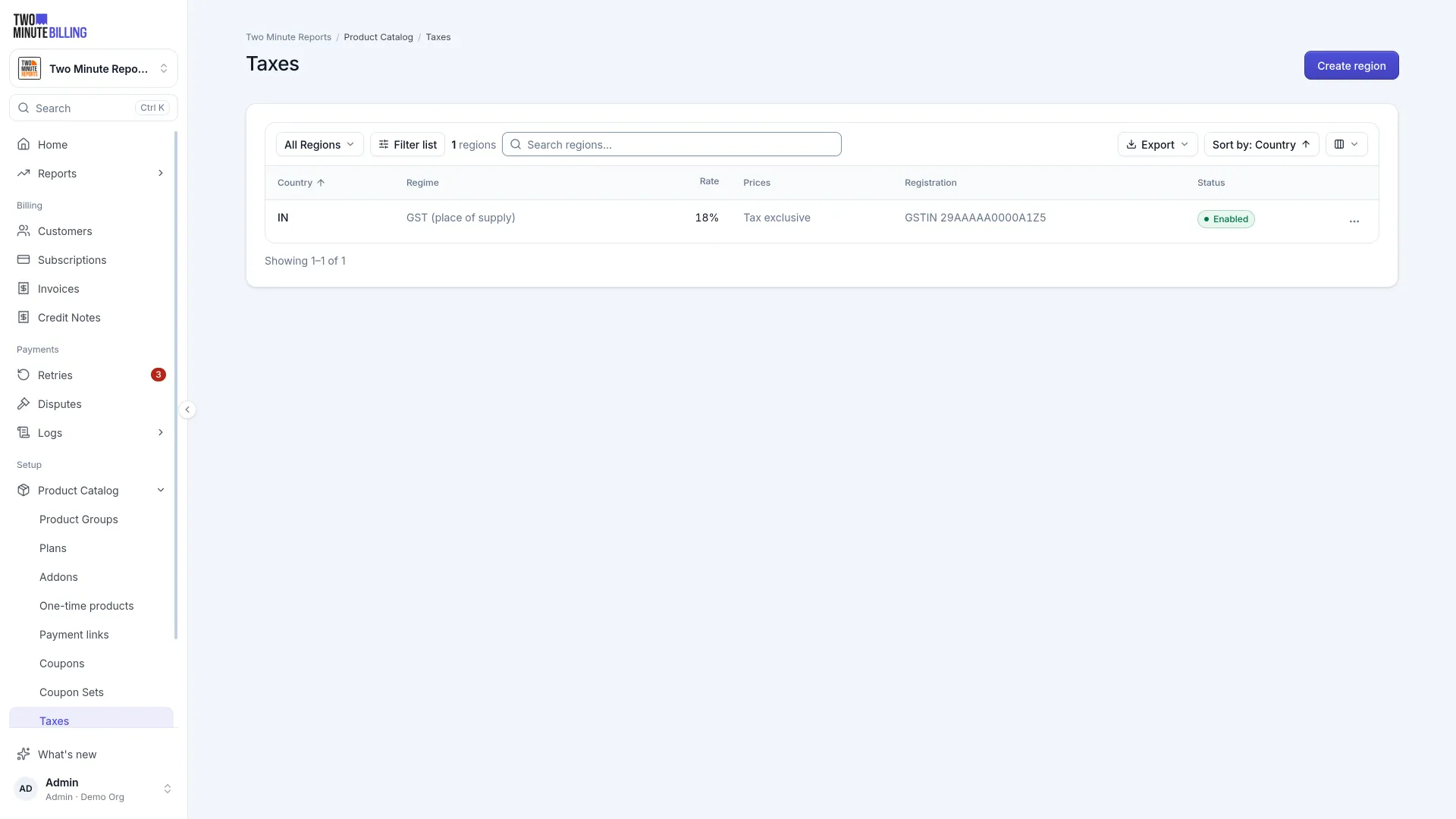
Two Minute Billing works out tax on every invoice line, from where your customer is and where you are registered. That is why a customer's billing address matters. You set up each place you charge tax once, under Settings → Taxes.
Add the places you charge tax
Add each country you are registered in. Within it, add the states or provinces where the rules are sub-national.
For each, set the rates. Some places need more than one rate on the same sale — an Indian domestic sale carries CGST and SGST separately, while an inter-state sale carries IGST instead. Both print separately on the invoice, because that is what the document has to show.
Record your registration numbers — in India, the GSTIN for each state you are registered in. Which one applies follows from where you are registered relative to your customer.
Decide whether prices include tax
| Setting | Your price of 100 means | Your customer pays |
|---|---|---|
| Exclusive | 100 before tax | 100 plus tax |
| Inclusive | 100 including tax | 100 |
Select the one that matches how you advertise. Most business-to-business sellers quote exclusive. Most consumer sellers quote inclusive.
Tax different products differently
A digital service and a physical good are often taxed differently in the same country. Create a tax profile for each class of product and set which profile a product uses.
Handle exemptions
| Situation | What to do |
|---|---|
| Customer is tax exempt | Mark them exempt on their customer record |
| Business customer in another country | Record their VAT number — reverse charge applies where the rules allow, and the obligation moves to them |
| Customer withholds tax and pays it themselves | Set their withholding rate. The invoice shows the full amount and the withheld part separately, so the difference is explained rather than looking like a short payment |
Each invoice keeps its own tax
When an invoice is issued, it records the rates, your registration and the place of supply as they were that day.
Changing a customer's address or a rate afterwards does not re-tax a document that already exists. New invoices use the new setup. That is what makes an old invoice still defensible a year later.
Related
CyberSource (coming soon)
CyberSource is coming soon to Two Minute Billing. Saved cards for subscriptions, with card fields hosted by CyberSource.
EU VAT for SaaS
Who charges VAT when you sell SaaS in the EU: the customer's country rate for consumers, reverse charge for businesses, VIES checks, OSS and VAT invoices.