

Connect a payment gateway
Two Minute Billing collects through your payment accounts, at your rates, paying into your bank. Until you connect one, it can raise invoices but cannot charge anything.
Open Settings → Payment gateways.
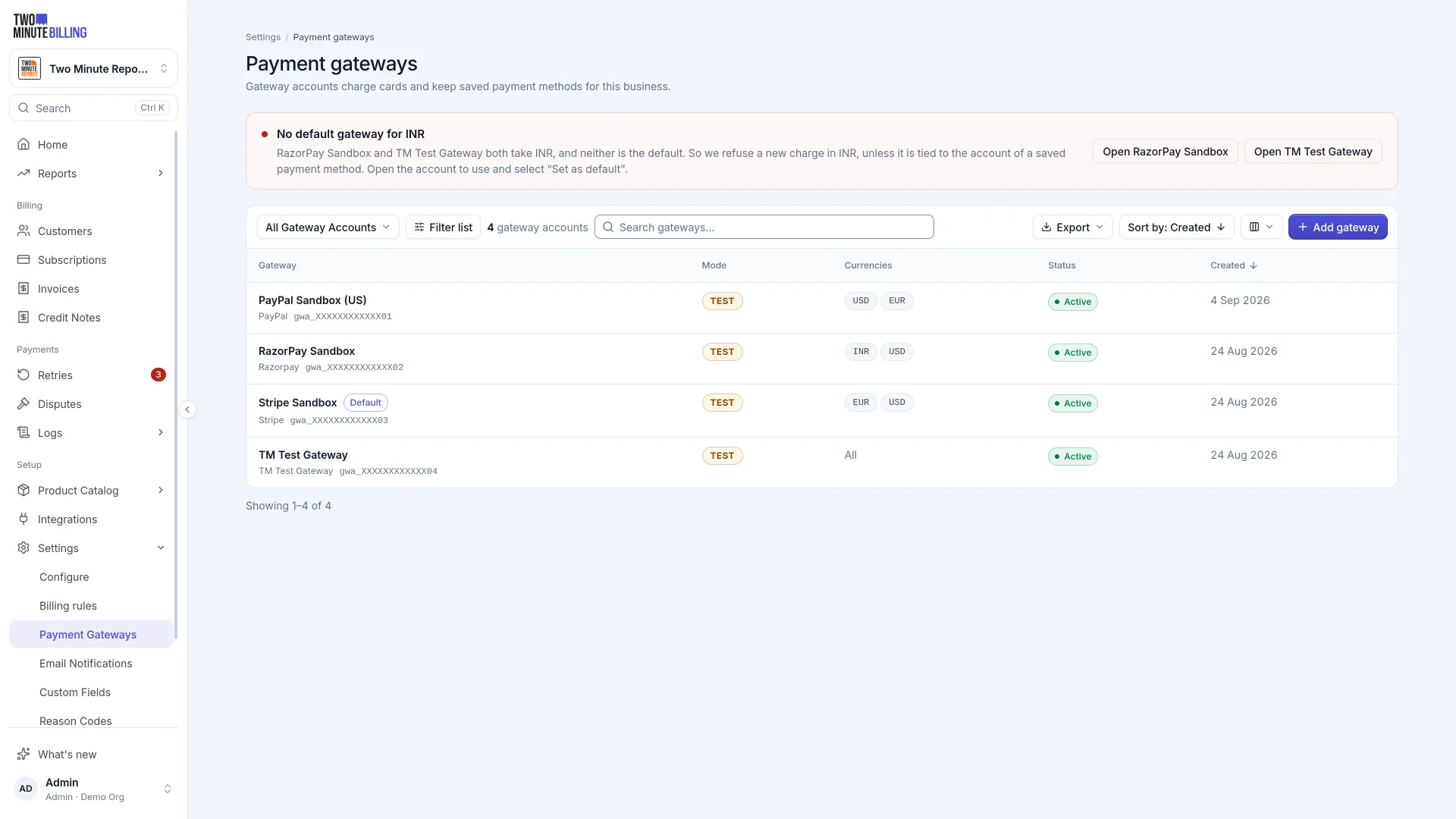
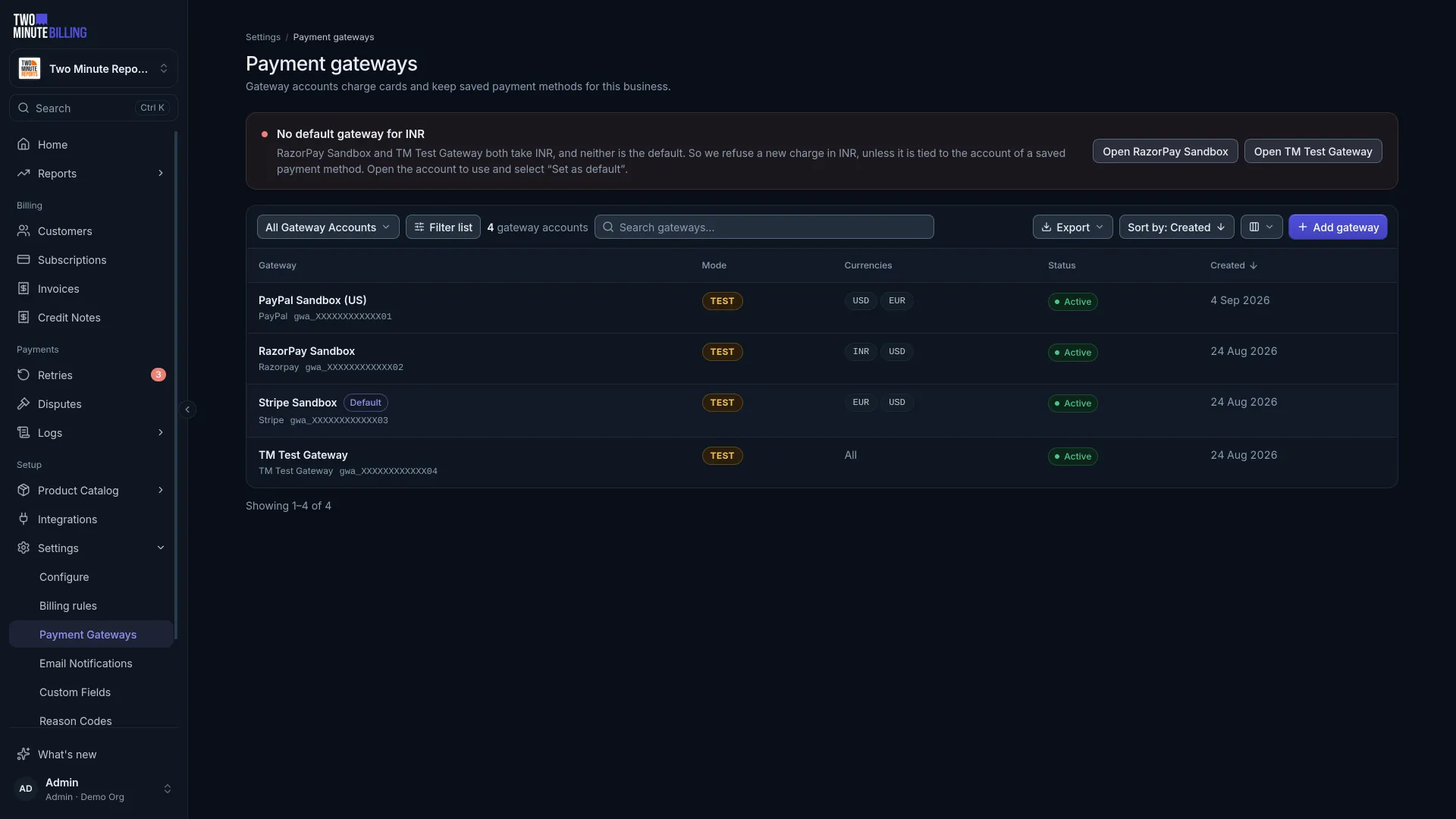
Connect an account
Add the account and paste in its credentials. Two Minute Billing stores them encrypted and uses them only to charge, refund and save cards on your behalf.
Tell it which currencies and which payment methods that account handles.
Set up your gateway
Two Minute Billing connects to 12 payment gateways. Each guide shows where to find the keys in the gateway, which permissions the keys need, how to connect them, and what to do about webhooks. Select your gateway:




















Coming soon: CyberSource. You cannot connect it yet.
Select a gateway
The payment methods and wallets below are the ones you can use today. For what each one asks of your customers, see Payment methods your customers can use.
Payment methods and wallets
| Gateway | Payment methods | Wallets on pay now |
|---|---|---|
| Stripe | Cards, Direct Debit (ACH), Direct Debit (SEPA) | Apple Pay, Google Pay |
| PayPal | PayPal wallet | — |
| Razorpay | Cards, UPI Autopay, Netbanking (eMandate) | — |
| Square | Cards, Afterpay (pay now), ACH (pay now) | Google Pay, Cash App Pay |
| Braintree | Cards, PayPal, Venmo | — |
| Checkout.com | Cards | Google Pay |
| Adyen | Cards | Apple Pay, Google Pay |
| Mollie | Cards, Direct Debit (SEPA), PayPal, Other methods that you activate in Mollie (pay now) | Apple Pay, Google Pay |
| Authorize.net | Cards, eCheck (ACH) | — |
| GoCardless | Direct Debit (Bacs), Direct Debit (SEPA), Direct Debit (ACH), Direct Debit (BECS), Direct Debit (BECS NZ), Pre-authorized debit (PAD), Direct Debit (Autogiro), Direct Debit (Betalingsservice), PayTo | — |
| Cashfree | Cards, UPI Autopay, eNACH | — |
| PayU | Cards, UPI Autopay | — |
Regions and currencies
| Gateway | Regions | Currencies |
|---|---|---|
| Stripe | Where Stripe serves your business. ACH in the US, SEPA in the EU | 132 currencies. Direct Debit (ACH): USD. Direct Debit (SEPA): EUR |
| PayPal | Where PayPal serves your business | 25 currencies |
| Razorpay | India | 124 currencies |
| Square | The country of each Square location | AUD, CAD, EUR, GBP, JPY, USD |
| Braintree | Where Braintree serves your business. Venmo in the US | 126 currencies. Venmo: USD |
| Checkout.com | Where Checkout.com serves your business | 141 currencies |
| Adyen | Where Adyen serves your business | 135 currencies |
| Mollie | Where Mollie serves your business | 27 currencies. Direct Debit (SEPA): EUR |
| Authorize.net | Where Authorize.net serves your business. eCheck for US bank accounts | AUD, CAD, EUR, GBP, NZD, USD. eCheck (ACH): USD |
| GoCardless | UK, euro area, US, Australia, New Zealand, Canada, Sweden and Denmark | GBP, EUR, USD, AUD, NZD, CAD, SEK, DKK |
| Cashfree | India | AED, EUR, GBP, INR, JPY, USD. Saved payment methods: INR, USD, EUR. UPI Autopay: INR. eNACH: INR |
| PayU | India | INR |
Use more than one
You can connect several accounts to one business. Two Minute Billing selects which to use from the currency, the payment method and what the customer does: pay now, or save a payment method.
That is how you run one gateway for rupee payments and another for everything else — without your customers or your catalog knowing anything about it.
Pay now uses an account that can take a payment now. An account on GoCardless only saves payment methods (it sets up a mandate), so Two Minute Billing does not use it when a customer pays an invoice now.
Renewals stay on the account that saved the payment method. Only that account can charge it, so a renewal never moves to another account. If you disable that account, its renewals fail until you enable it again or the customer saves a new payment method.
When more than one account matches, Two Minute Billing uses the business's default gateway account. If no matching account is the default, the payment is refused with a message to set a default.
Check it works
Create a customer in test mode, save a payment method with the test details in your gateway's guide (under Test it), and collect an invoice. Logs shows the actual call to the provider and what came back.
When a payment provider tells you something later
Providers sometimes confirm or reverse a payment hours after the fact. Two Minute Billing listens for those and keeps your records straight: a payment that settles late is marked paid, and one that reverses reopens the invoice so it goes back into your retry queue.
You do not have to reconcile that by hand.
If Two Minute Billing cannot process a message from your gateway, it tries again on its own for about four days, also after the gateway stops sending it. If the last try fails, Gateway Webhooks shows the message with the reason, and you can select Replay to try again.
Related
Failed payments
Set a retry schedule for declined cards, decide what happens when retries run out, and work the retry queue, so you keep revenue that failed payments risk.
Stripe
Connect your Stripe account to Two Minute Billing: find your API keys, connect them, and let Two Minute Billing register the webhook. Cards, ACH and SEPA Direct Debit.