

PayU


Two Minute Billing charges subscriptions in INR through your PayU account. You keep your PayU rates, and PayU pays out to your bank as usual.
- The customer saves a card or approves UPI Autopay on the PayU checkout page. This makes a mandate (for a card, a standing instruction). On a hosted checkout, that same step takes the first payment, so the customer pays once at signup.
- Before each renewal, Two Minute Billing sends an advance notice through PayU, and charges the mandate at least 24 hours later (25 hours for UPI Autopay). See UPI Autopay for the UPI rules.
- A subscription that you create through the API or the dashboard, for a customer who already has a PayU mandate, does not charge at once. Its first invoice waits for the advance notice, like a renewal.
- A one-time payment uses every method that is enabled on your PayU account.
- Refunds go back to the customer through PayU.
Before you start
- A PayU India account. PayU gives you a test account and, after it checks your website, a live account. Connect the test key to a test business and the live key to a live business.
- PayU takes INR only.
- Cards and UPI Autopay for subscriptions. Net banking (eNACH) mandates are coming soon.
- PayU must turn on recurring payments for cards and for UPI (UPI SI) on your account. Ask your PayU account manager or PayU support before you go live. See Permissions.
- You need permission to manage payment gateways in Two Minute Billing. The owner and admin roles have it.
Find your API keys
In PayU, open Developer → API Keys. Make sure the mode toggle at the top shows the mode of the business that you connect (Test Mode or live).
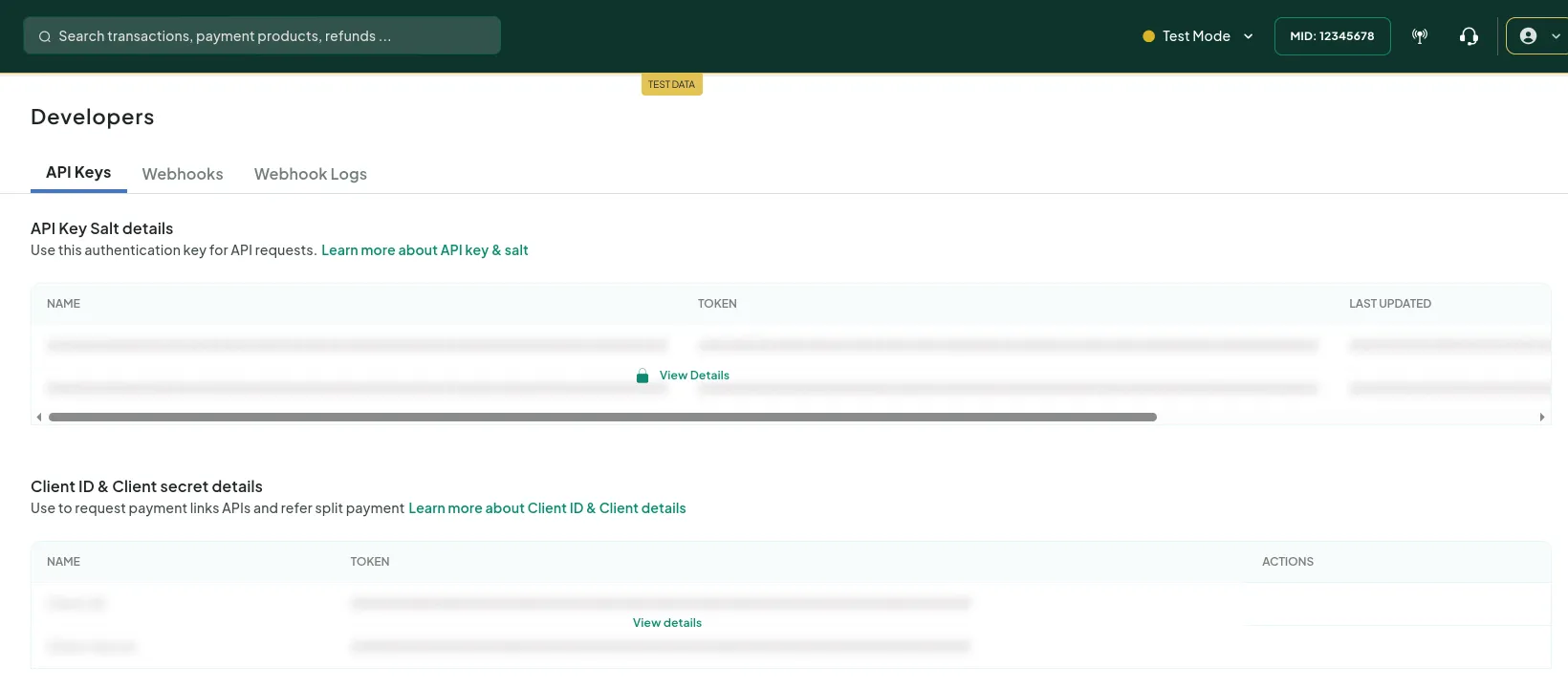
You need two values:
| Field | Where to find it | Looks like |
|---|---|---|
| Merchant Key | PayU Dashboard → Developer → API Keys. The business test or live mode selects the PayU environment. | — |
| Merchant Salt (v1) | On the same page. We use it to sign requests and to check the webhooks from PayU. | — |
Permissions
| What PayU must enable or you must set | Who turns it on | Two Minute Billing uses it to |
|---|---|---|
| Recurring payments on cards (standing instructions) | PayU's integration team, on request | Save a card mandate and charge each renewal against it. Without it, a card setup is paid but no mandate is made |
| Recurring payments on UPI (UPI SI, UPI Autopay) | PayU's integration team, on request | Make a UPI Autopay mandate and charge each renewal against it. Without it, PayU refuses the UPI setup |
| UPI Autopay mandate updates | PayU's integration team | Know at once when the customer pauses, resumes or revokes the mandate in their UPI app. Without it, we find out at the next advance notice |
| Merchant Salt (32-bit, v1) | You copy it from API Keys | Sign every request to PayU and check the payment webhooks |
| Payments webhook: Successful | You, under Developer → Webhooks | Book a card setup or a payment that succeeded |
| Payments webhook: Failed | You, under Developer → Webhooks | Book a payment that failed, or that PayU took back |
| Payments webhook: Refund | You, under Developer → Webhooks | Book refunds, including refunds made in the PayU dashboard |
| Card mandate updates from the bank | PayU support | Know when a bank cancels or changes a card mandate |
| Refund status callback | Your PayU account manager | Optional. The Refund webhook above is enough |
| Signed dispute webhooks | Your PayU account manager | Not used. You record chargebacks by hand (see Troubleshoot) |
Check credentials confirms that PayU accepts your key and salt. It cannot see whether PayU has turned on recurring payments. Test a card setup and a UPI setup in your test business to be sure.
Connect it in Two Minute Billing
- Open Settings → Payment gateways and click Add gateway.
- Select PayU and paste the Merchant Key and the Merchant Salt (v1).
- Select the payment methods this account handles.
- Click Create gateway account.
Then open the account and click Check credentials. Healthy means PayU accepted the key and the salt.
The payment methods you can turn on for PayU:
- Cards — INR only. We send the advance notice through PayU at least 24 hours before each renewal debit.
- UPI Autopay — INR only. At most ₹15,000 for each payment. We send the advance notice through PayU at least 25 hours before each renewal debit. The debit can take some minutes to complete.
- Net banking (eNACH) (coming soon) — INR only. PayU must enable it on your account. Banks do not accept refunds of these debits.
UPI Autopay
- ₹15,000 at most for each payment. PayU does not let a UPI Autopay mandate take more. The checkout does not offer UPI Autopay for a plan above that, and the mandate limit that the customer approves is never higher.
- An advance notice before each debit. Two Minute Billing sends it through PayU at least 25 hours before the debit, for the exact amount. If the amount changes after the notice, we withdraw that notice at PayU and send a new one, so the debit moves 25 hours later.
- Retries. PayU lets one notice cover the first debit and three retries. A retry on the debit day uses the same notice. A retry on a later day gets a new notice and waits 25 hours.
- One open notice for each mandate. PayU takes a new notice only when the last one is debited or withdrawn. When two subscriptions use the same UPI mandate, the second debit waits for the first.
- A debit can take some minutes to complete. The payment stays pending until PayU's Successful or Failed webhook arrives.
- Banks do not debit UPI Autopay from 10:00 to 13:00 and from 17:00 to 21:30 IST. We schedule the debits outside these hours.
- The customer can pause or revoke the mandate in their UPI app. We stop the debits when PayU tells us (see Permissions), or at the next advance notice.
Currencies
Two Minute Billing offers INR only on PayU.
PayU takes other currencies when it enables cross-border payments on an account. Two Minute Billing does not offer them on PayU yet.
Webhooks
PayU tells Two Minute Billing about things that happen outside the checkout page: a payment that completes after the customer leaves, a refund made in the PayU dashboard, a payment that PayU takes back. Copy the notification URL from the gateway account page in Two Minute Billing.
PayU does not let Two Minute Billing register the webhook, so you add it in PayU yourself.
- In the PayU Dashboard, go to Developer → Webhooks → Create Webhook.
- For Type, select Payments. For Event, select Successful.
- Paste the notification URL from the gateway account page.
- Click Create. Then do these steps again for the Failed event and for the Refund event.
- Your Merchant Salt signs the payment events. You do not need a webhook secret.
- Ask PayU support to send mandate cancellation and modification updates to the same URL.
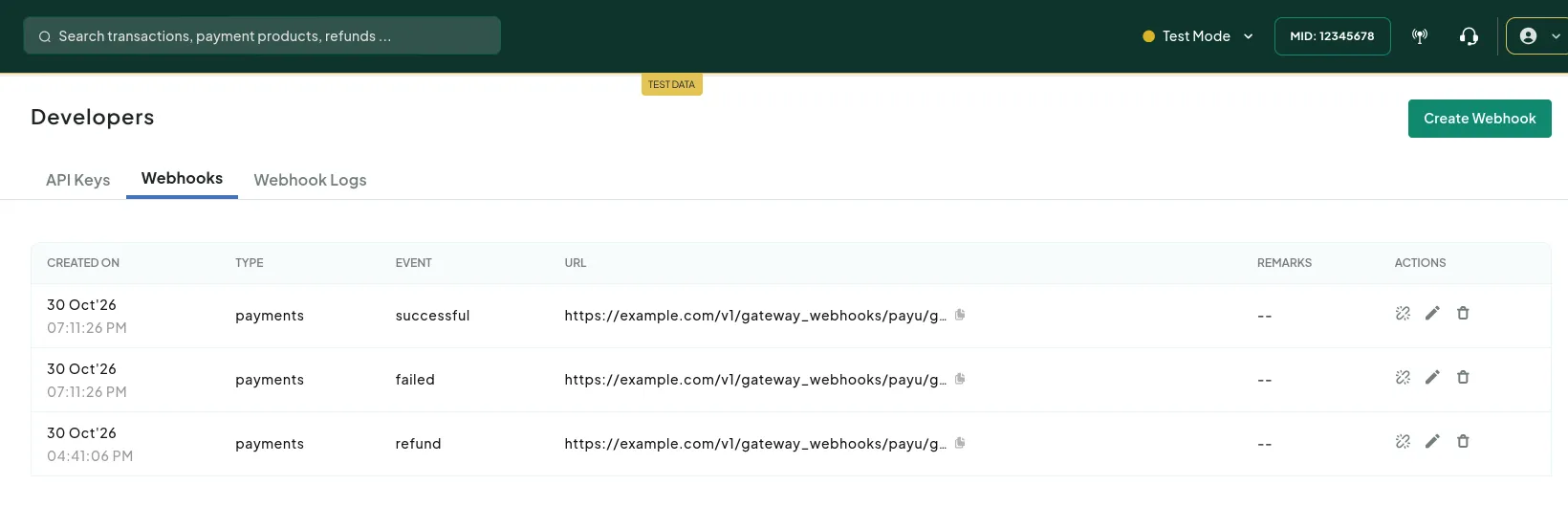
Do not add a Dispute webhook. Two Minute Billing does not book chargebacks from PayU. Record them by hand.
Test it
- In your test business, open a hosted checkout link for a plan and enter the customer's name, email and a 10-digit mobile number. PayU refuses a card setup without a phone number.
- On the PayU page, use the card
5506 9004 8000 0008, expiry12/30, CVV123, and the OTP123456. The customer pays the first invoice in this step, and the subscription starts. - Refund part of the payment from the invoice. In the PayU test environment, a refund settles about one hour later, and a refund under ₹100 always fails.
- To test UPI Autopay, use a plan whose first payment is ₹100, with no tax. PayU's test
environment takes ₹100 only, and tax would make it ₹118. On the PayU page, select Enter Any
UPI ID, enter
9999999999@upi, click APPLY, and then PROCEED. The test environment approves the mandate at once, and the customer pays the first invoice.
Logs shows each call to PayU and PayU's answer.
Go live
- In PayU, switch to live mode and open Developer → API Keys. Copy the live Merchant Key and Merchant Salt (v1).
- Make sure PayU has turned on recurring payments for your live account.
- In your live business, add PayU with those keys.
- Add the three Payments webhooks in live mode, with the same steps as under Webhooks.
Troubleshoot
- Check credentials says that PayU refused the Merchant Key or the Merchant Salt. The key or the salt is wrong, or they belong to the other mode. Copy both again from Developer → API Keys, with the mode set to match the business.
- The customer pays at setup, but no card is saved. PayU took the payment but made no mandate. The card does not support recurring payments, or PayU has not turned them on for your account. Two Minute Billing refunds that payment. Ask the customer to use a different card, or ask PayU to turn on recurring payments.
- A renewal is not paid on the day it is due. This is expected. Two Minute Billing sends the advance notice through PayU, and the debit follows at least 24 hours later (25 hours for UPI Autopay).
- A renewal fails and the card shows as not usable. The customer's bank cancelled the card mandate. Ask the customer to set up the card again.
- A UPI Autopay renewal fails with "The payment mandate is no longer active". The customer revoked the mandate in their UPI app. Ask the customer to set up UPI Autopay again, or to add a card.
- A customer's bank raised a chargeback. Open the payment under Transactions and click Record dispute.
Related
Cashfree
Connect your Cashfree account to Two Minute Billing: find your App ID and Secret Key, connect them, and add the two webhooks in Cashfree. UPI Autopay, eNACH and card mandates in INR, and card mandates in USD and EUR.
CyberSource (coming soon)
CyberSource is coming soon to Two Minute Billing. Saved cards for subscriptions, with card fields hosted by CyberSource.