

Cashfree


Two Minute Billing collects recurring payments through your Cashfree account: UPI Autopay, eNACH and card mandates in rupees, and card mandates in USD and EUR. The customer approves a mandate once, and Two Minute Billing debits each renewal against it. Invoices paid now can also be in USD, EUR, GBP, AED or JPY, by card. You keep your Cashfree rates, and Cashfree settles to your bank as usual.
Before you start
- A Cashfree account. Test keys are available at once. Production keys need Cashfree to activate your account, and two-factor authentication to show them. Connect the test keys to a test business and the production keys to a live business.
- UPI Autopay and eNACH mandates are INR only. Card mandates take INR, USD and EUR. Pay now
also takes cards in USD, EUR, GBP, AED and JPY. Cashfree enables each currency for each
account: ask Cashfree to enable international payments for the currencies you sell in. Then
enable International payments on the gateway account in Two Minute Billing.
Give a phone number outside India with
+and the country code (for example+14155550100). - Two Minute Billing asks Cashfree for at least 1 whole unit of the currency (for example 1 USD or 1 JPY) on each payment.
- Each customer who pays by mandate needs a name and a phone number in Two Minute Billing. Cashfree refuses a mandate without them. An INR mandate needs a 10-digit Indian mobile number.
- You need permission to manage payment gateways in Two Minute Billing. The owner and admin roles have it.
Find your API keys
In the Cashfree Merchant Dashboard, open Developers → API Keys. For test keys, click Switch to Test at the top right first. To see a full key, click the icon next to it and select View API Key.
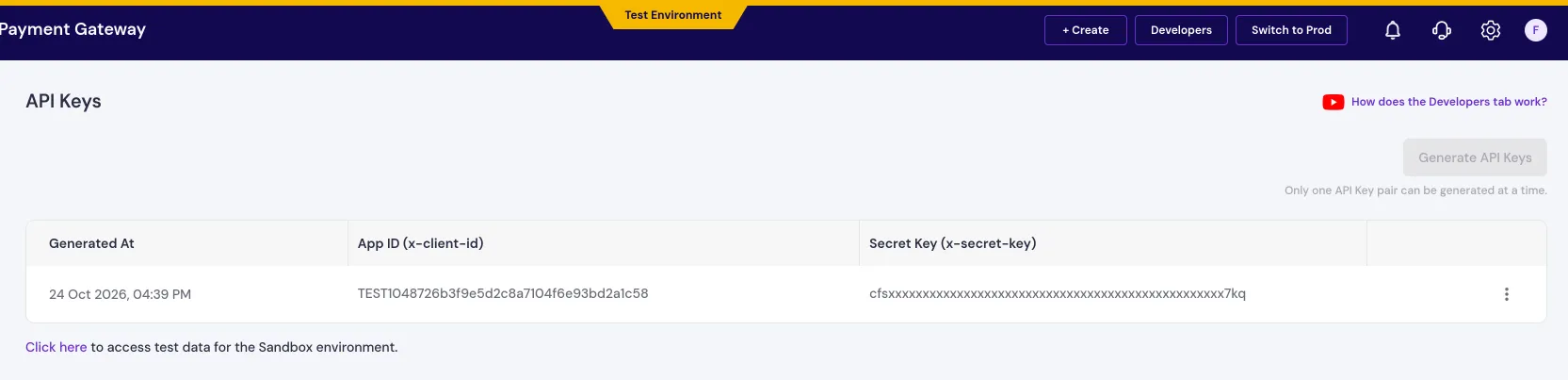
You need two values:
| Field | Where to find it | Looks like |
|---|---|---|
| App ID | Cashfree Merchant Dashboard → Developers → API Keys. The business test or live mode selects the Cashfree environment. | — |
| Secret Key | On the same page, next to the App ID. | — |
Permissions
- Subscriptions. Mandates need the Cashfree Subscriptions product on your account. If a mandate cannot be made, ask Cashfree to activate it.
- Domain whitelisting (live only). In production, Cashfree accepts payments only from approved domains. Add the domain where your customers pay under Developers → Whitelisting. Cashfree reviews it in about 24 hours.
- Webhook versions. The Payments endpoint must use version 2025-01-01 and the Subscriptions endpoint version 2026-01-01. Check credentials tells you if a version is wrong.
Connect it in Two Minute Billing
- Open Settings → Payment gateways and click Add gateway.
- Select Cashfree and paste the App ID and the Secret Key.
- Select the currencies and the payment methods this account handles.
- Click Create gateway account.
Then open the account and click Check credentials. Healthy means Cashfree accepted the keys. After the first webhooks arrive, the check also tells you if a webhook is on the wrong version.
The payment methods you can turn on for Cashfree:
- Cards — Saved cards: INR, USD and EUR. Cashfree sends the debit notice for INR. We send it for USD and EUR. Pay now also takes GBP, AED and JPY. Cashfree must enable international payments on your account.
- UPI Autopay — INR only. The debit settles asynchronously.
- eNACH — INR only. The bank approves the mandate in 1 to 2 days.
For UPI Autopay, Two Minute Billing asks Cashfree to send the customer a pre-debit notice, then takes the debit about 25 hours after Cashfree delivers it. For eNACH and INR cards, Cashfree sends the notice itself. For USD and EUR cards, Two Minute Billing emails the notice to the customer.
Currencies
Two Minute Billing offers these 6 currencies on Cashfree:
AED, EUR, GBP, INR, JPY, USD
Currencies other than INR need Cashfree to enable international payments on your account. Cashfree settles in INR.
A new gateway account takes INR only. After Cashfree enables international payments on your account, enable International payments when you create the gateway account in Two Minute Billing, or later in its settings. Until you do, Cashfree gets no payments in other currencies.
Some payment methods take one currency only:
| Payment method | Currency |
|---|---|
| UPI Autopay | INR |
| eNACH | INR |
To save a payment method, Cashfree takes INR, USD and EUR only.
If you leave Currencies empty on the gateway account, the account takes each currency of your business that is on this list.
Webhooks
Cashfree tells Two Minute Billing about everything that happens after a mandate is set up: a debit that succeeds or fails, a mandate the customer cancels, a refund, a dispute. Payment events and subscription events come from two different tabs on Cashfree's webhook page, so you add the same address twice: on the Payments tab with version 2025-01-01, and on the Subscriptions tab with version 2026-01-01.
Cashfree does not let Two Minute Billing register the webhook, so you add it in Cashfree yourself.
- In Cashfree: go to Developers → Webhooks → Add Webhook Endpoint.
- Paste the notification URL from the gateway account page.
- Select webhook version 2025-01-01. Select these events: success payment, failed payment, user dropped payment, instrument active, instrument failed, refund, auto refund, dispute created, dispute updated and dispute closed.
- Click Continue and save. Then copy the webhook endpoint's Secret Key (not your API Secret Key), paste it on the gateway account page and click Save.
- On the Subscriptions tab of the same page, add the same URL. Select webhook version 2026-01-01. Then select all subscription events.
In Cashfree's webhook form, you can click Test to send a test event to the address. It succeeds when the address is correct.
Test it
In your test business, create a customer with a name and a 10-digit mobile number, and set up a
UPI Autopay mandate for it. When Cashfree's page asks for a UPI ID, enter the test UPI ID
testsuccess@gocash (testfailure@gocash makes it fail). Collect an invoice: Two Minute Billing asks Cashfree to send the
pre-debit notice, and the invoice is marked paid after the debit about a day later. Logs shows each
call to Cashfree and Cashfree's answer.
Go live
- In Cashfree, turn off test mode and open Developers → API Keys. Copy the production App ID and Secret Key.
- If you sell in USD, EUR, GBP, AED or JPY, ask Cashfree to enable each of these currencies on your production account. Cashfree has no API that shows them, so Check credentials cannot find a currency that is not enabled. A payment in that currency then fails at Cashfree.
- In your live business, add Cashfree with those keys.
- Add both webhooks in production with the same steps as under Webhooks, and paste
each webhook endpoint's Secret Key (not your API Secret Key) on the live gateway account page. Production webhook addresses must
use
https.
Troubleshoot
- Check credentials says "We could not check the credentials." with "authentication failed". The App ID or the Secret Key is wrong, or they belong to the other environment. Copy both again from Developers → API Keys, with test mode set to match the business.
- Check credentials says "Correct the settings below." with "Cashfree sends … webhooks on version …". Select the version that the message names on that tab in Cashfree: 2025-01-01 on the Payments tab, 2026-01-01 on the Subscriptions tab.
- A mandate setup is refused with "Cashfree requires a phone number for recurring payments" or "Cashfree requires the customer's name for recurring payments". Add the missing detail to the customer, then try again. For an INR mandate, the phone number must be a 10-digit Indian mobile number.
- A checkout or an invoice in USD, EUR, GBP, AED or JPY does not offer Cashfree. Enable International payments on the gateway account. Do this only after Cashfree enables international payments on your Cashfree account.
- A card mandate in USD or EUR is refused with "A bank in India issued this card". Cashfree does not take subscription payments in another currency from a card issued in India. Ask the customer to use a card issued outside India, or to subscribe in INR.
- A charge fails with "The customer authorized this payment method for payments in INR only". The invoice is in another currency than the customer's mandate. Two Minute Billing does not send the charge to Cashfree. Ask the customer to add a payment method for that currency.
- A UPI renewal is not paid on the day it is due. This is expected. Cashfree must deliver the pre-debit notice first, and the debit follows about 25 hours later.
Related
GoCardless
Connect your GoCardless account to Two Minute Billing: make an access token, connect it, and add the webhook in GoCardless. Bank Direct Debit in eight schemes, and PayTo.
PayU
Connect your PayU India account to Two Minute Billing: find your key and salt, check what PayU must enable, and add the three payment webhooks. Card and UPI Autopay mandates in INR.