AI billing software
AI billing for tokens and credits, at a margin you can see
AI billing charges customers for the model calls your product makes. Two Minute Billing is billing software with an open-source edition. It prices each model and token type, sells prepaid credits, checks the balance before each call, and shows your margin per customer after model costs. It collects through your own payment gateway.
What AI billing software must do
Price each model, and keep up
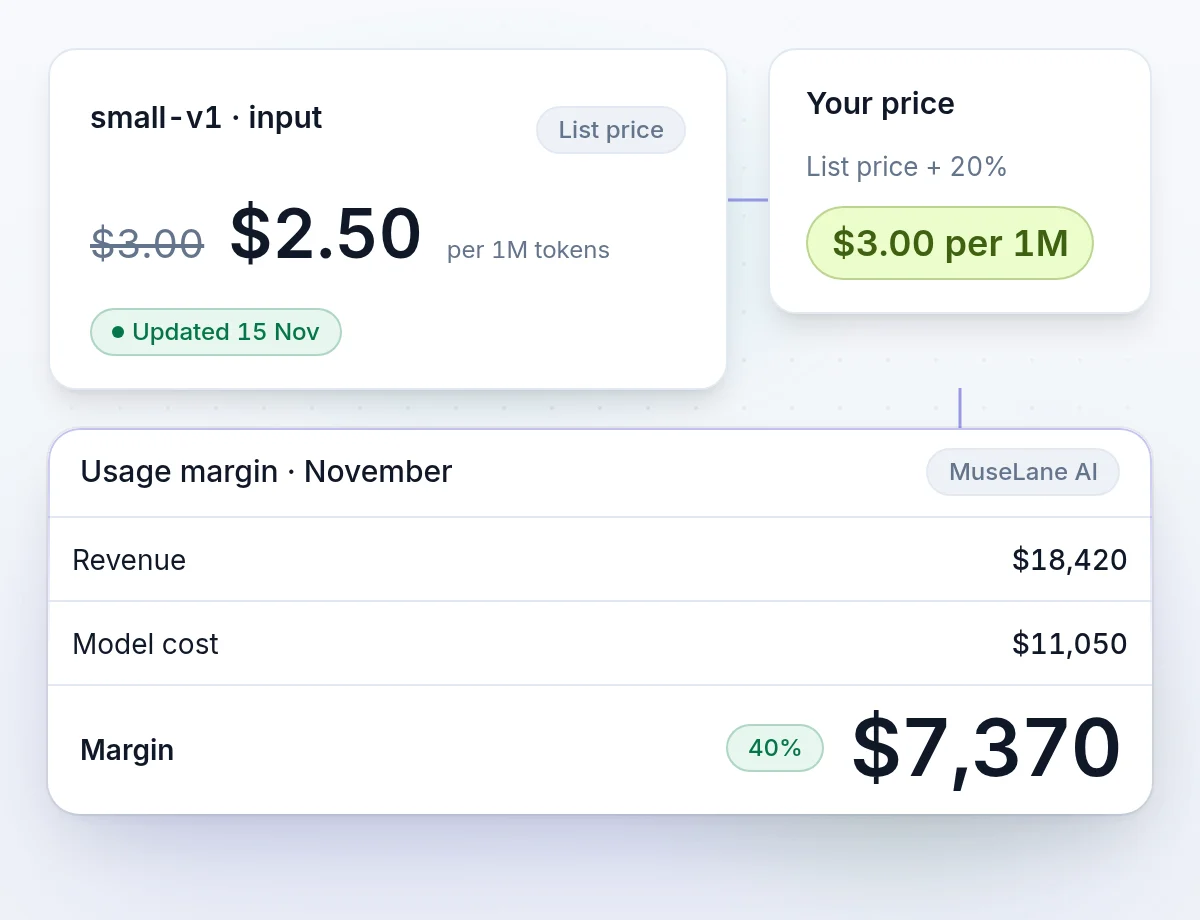
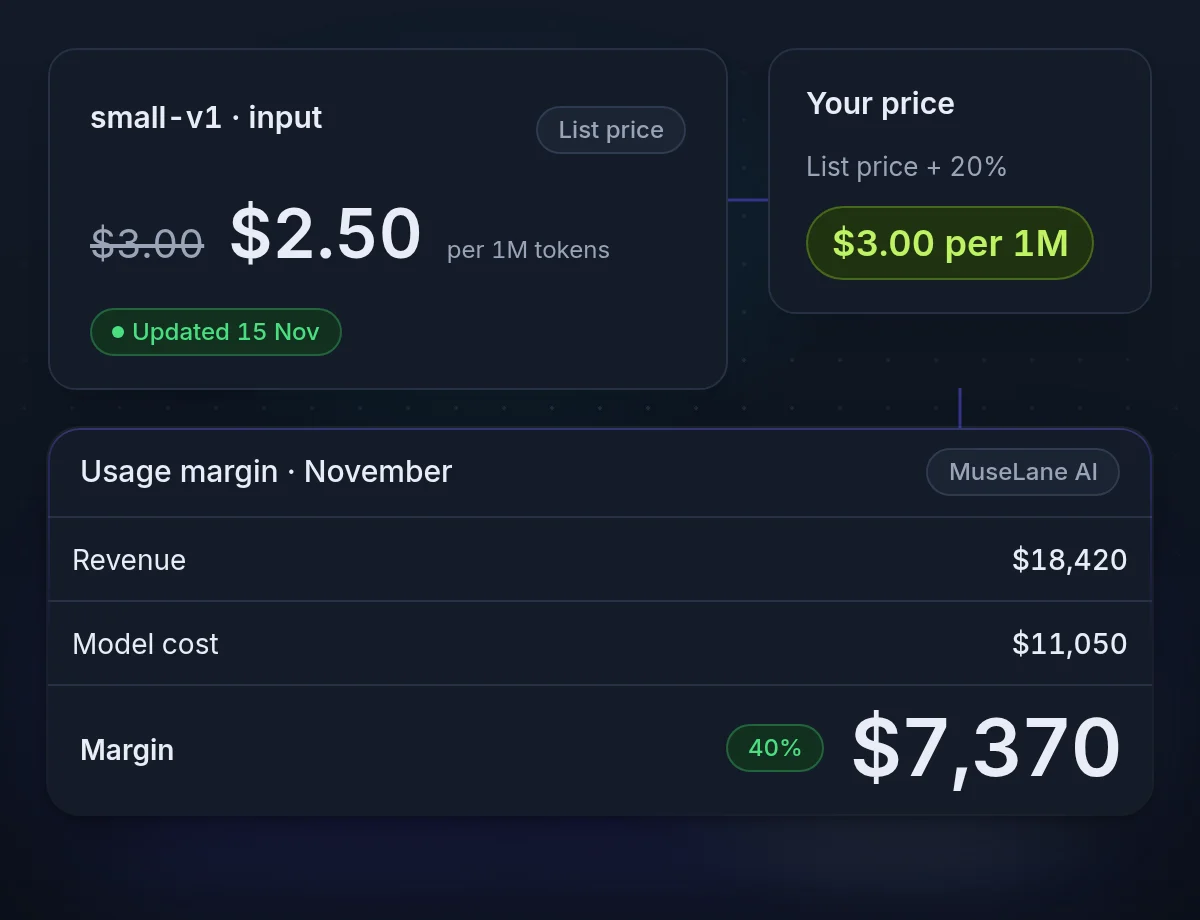
Bill from the model's list price plus your markup. When a list price changes, the next call bills at the new price.
Show margin after model cost
See which customers cost more in model fees than they pay, before the month ends.
Stop usage nobody will pay for
Prepaid credits collect the money first. A check before each call stops usage that nobody will pay for.
Model pricing
A price for each model and token type
Quote rates the way model providers do, such as $3.00 per 1M input tokens. Set them by hand, or bill from a model price list that we keep current for you.
- A dated model price listUpdated two times a day. Large or odd changes wait for review.
- Markup on list or on costRecord what you really pay a provider, and price as cost plus.
- A price for one customerA lower markup or fixed rates for a large account.
- Every line cites its priceEach invoice line names the price row that billed it.
Cost and margin
Margin by customer, model and meter
AI usage margin is revenue after discounts and credit notes, minus the model cost of the same usage. Example: $18,420 revenue minus $11,050 model cost is $7,370, a 40% margin.
- Your real costA negotiated rate, the cost on each event, or the list price.
- Usage so far this periodEach customer's usage by day, cost, margin and a projection.
- A notice when a price movesYou hear about each change and which subscriptions it affects.
- Preview a rate changeSee what each customer's last period costs at the new rate.
Prepaid credits
Sell prepaid AI credits, then check them before each call
Prepaid AI credits are units a customer buys before using your AI features. Each model call spends credits. Customers buy packs in the portal or get credits with their plan. Your app checks the balance before each call: 95% of checks answer in under 100 ms.
- Your own credit unitShow "1,000 credits" instead of a money amount.
- Plan credits that roll overCredits each period, with a rollover by percent, cap or number of periods.
- Holds for calls in progressCalls that run at the same time cannot overspend the balance.
- Free credit comes off before taxPromotional credit applies before tax is calculated.
Spend controls
Stop usage at a limit, yours or your customer's
Set spend limits per customer, per subscription or per user. Your customers can set a lower limit of their own in the portal. The lower limit applies.
- Alerts before the limitOn spend, usage, balance or days of credit left.
- Credit runwayDays of credit left at the last 7 days' rate.
- Automatic top-upBuys credit at a balance or on a date. Credit arrives only after the payment succeeds.
- Invoice large usage earlyBill usage when it reaches an amount, not at month end.
Usage your customers can see
Show usage inside your own app
Add the usage widget to your settings page. It shows the balance, days left, usage this period, the estimated bill and the limits, in your colors and font. The customer portal shows the same.
From a model call to a paid invoice
To bill for AI tokens, set a price per 1M tokens for each model and token type, such as the list price plus 20%. Check the customer's credit before each call, and report the tokens from each response. Credits pay first. The rest goes on the invoice, with tax.
- Step 1
Price your models
From the price list plus a markup, or your own rates.
- Step 2
Check before the call
Your app asks if the customer has credit and room under the limit.
- Step 3
Report the response
The SDK helper turns each model response into usage.
- Step 4
Credits pay, the rest bills
Credits pay first. Usage they do not cover goes on the invoice, with tax.
Money you can trace, cards you never hold
How we keep billing safeAn append-only ledger
Balances come from double-entry records. A correction is a new entry, so every figure traces back to the rows behind it.
PCI DSS SAQ-A scope
Card numbers go from the browser straight to your payment gateway. They never reach our servers or yours.
An audit log
Who changed what, from the dashboard or the API, with the values before and after.
AI billing questions
Bill your first model call in test mode
Price a model, sell a credit pack and check a balance before you go live.